The standing desk arrived three weeks ago. Day one, you stood for eight hours straight, feeling virtuous about escaping the “sitting is the new smoking” epidemic. Day two, your lower back screamed, your feet throbbed, and you discovered muscles in your calves you didn’t know existed. By day three, the expensive desk was locked in the seated position, and you were back to exactly where you started, minus $600.
This pattern repeats in home offices and corporate workspaces across the country. The standing desk industry has exploded, but the education around actually using these tools has lagged far behind. The result: millions of standing desks functioning as very expensive sitting desks, and a growing population convinced that “standing desks don’t work” when the real problem is that they’ve never learned to use them correctly.
Standing desks do work, when deployed as part of a thoughtful movement strategy rather than as a magic cure. The research supports their benefits for metabolic health, back pain reduction, and energy levels, but only when users avoid the common mistakes that turn a helpful tool into a source of new problems. Here’s what most people get wrong, and how to fix it.
The Fundamental Misunderstanding: It’s About Movement, Not Position
The phrase “sitting is the new smoking” contains a hidden trap. It implies that the problem is the seated position itself, leading people to conclude that the solution is simply standing instead. But the human body doesn’t care whether you’re sitting or standing; it cares whether you’re moving. Static postures of any kind, maintained for hours, create problems. A person standing motionless for eight hours faces just as many issues as a person sitting motionless for eight hours, just different issues.
The real enemy isn’t sitting; it’s stillness. Your body evolved for varied movement throughout the day: walking, squatting, reaching, climbing, carrying. The modern knowledge work environment eliminates nearly all of this movement, trapping you in whatever position your desk demands. A standing desk doesn’t solve this problem if you simply trade static sitting for static standing. What it does provide is an additional position option, making it easier to vary your posture throughout the day.
Research published in the British Journal of Sports Medicine found that breaking up prolonged sitting with standing or light activity improved metabolic markers and reduced musculoskeletal discomfort. However, the key word is “breaking up,” not “replacing.” The studies that show standing desk benefits typically involve participants alternating between positions, not standing all day. The ideal sitting-to-standing ratio for most people falls somewhere around 50/50, rotating positions every 30-60 minutes based on comfort and task demands.
This reframe changes everything about how you approach your standing desk. Instead of viewing it as an escape from sitting, view it as a movement tool that expands your postural options. The goal isn’t to stand more; it’s to move more, and the standing desk is one component of a broader strategy that includes walking meetings, standing phone calls, and deliberate movement breaks throughout the day.
Mistake #1: Standing Like a Statue
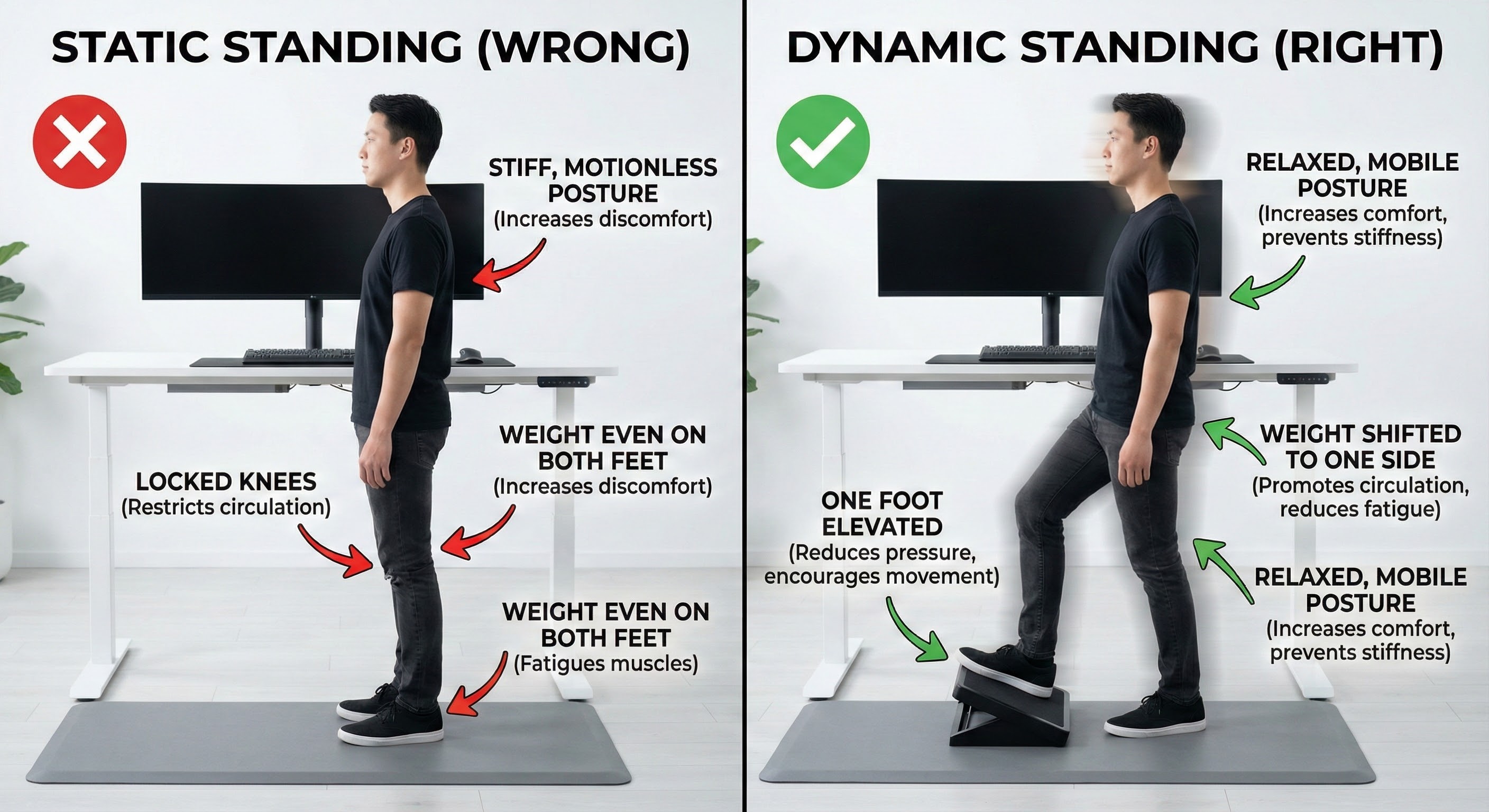
The most common standing desk mistake is treating standing as a static position rather than an active, dynamic state. When you stand motionless with your weight evenly distributed and your knees locked, several problems develop rapidly.
Blood pools in your lower extremities because the calf muscle pump isn’t activated. This venous pooling contributes to the foot and leg fatigue that drives most people back to sitting. Over time, habitual static standing can contribute to varicose veins and other circulatory issues, particularly in people with predisposing factors.
The lumbar spine compresses under the constant load of supporting your upper body against gravity. Without movement to vary the stress distribution, pressure concentrates on the same spinal structures hour after hour. This compression explains why many people develop lower back pain from standing desks despite expecting the opposite outcome.
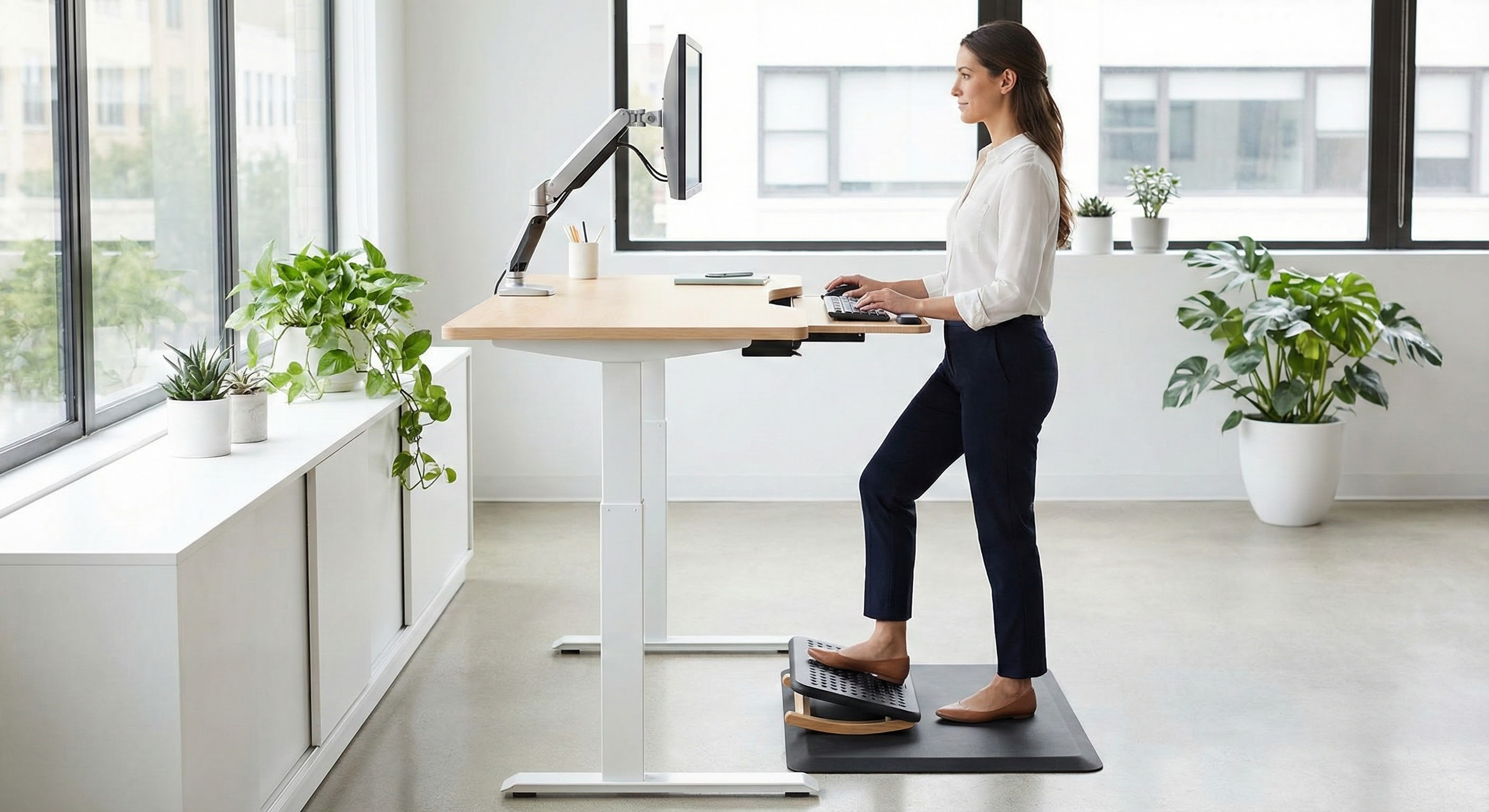
The fix is dynamic standing, which means constantly shifting your weight, changing your position, and engaging different muscle groups throughout the day. The “Captain Morgan” stance, placing one foot on a raised surface like a footrest or small box, is one of the most effective techniques. This position tilts your pelvis, engages your core, and shifts the load off your lumbar spine. Switch legs every 10-15 minutes to distribute the benefit.
Weight shifting is equally important. Consciously move your weight from one foot to the other, from heels to toes, in small circles and figure-eights. These micro-movements activate the calf muscle pump, maintain blood flow, and prevent the fatigue that comes from static loading. Set a gentle reminder every 15 minutes to shift position if you tend to lock into place and forget to move.
The ergonomics principle to remember: “The best posture is the next posture.” No single position, no matter how “correct,” is healthy if maintained indefinitely. The standing desk’s value lies in adding positions to your repertoire, not in finding the one perfect stance.
Mistake #2: Skipping the Anti-Fatigue Mat
Standing on hard surfaces, whether hardwood, concrete, or thin commercial carpet, sends shock waves through your skeletal system with every subtle weight shift. The impact accumulates throughout the day, contributing to foot pain, knee discomfort, and accelerated fatigue. Many people who “can’t handle standing desks” are actually suffering from inadequate flooring rather than any problem with standing itself.
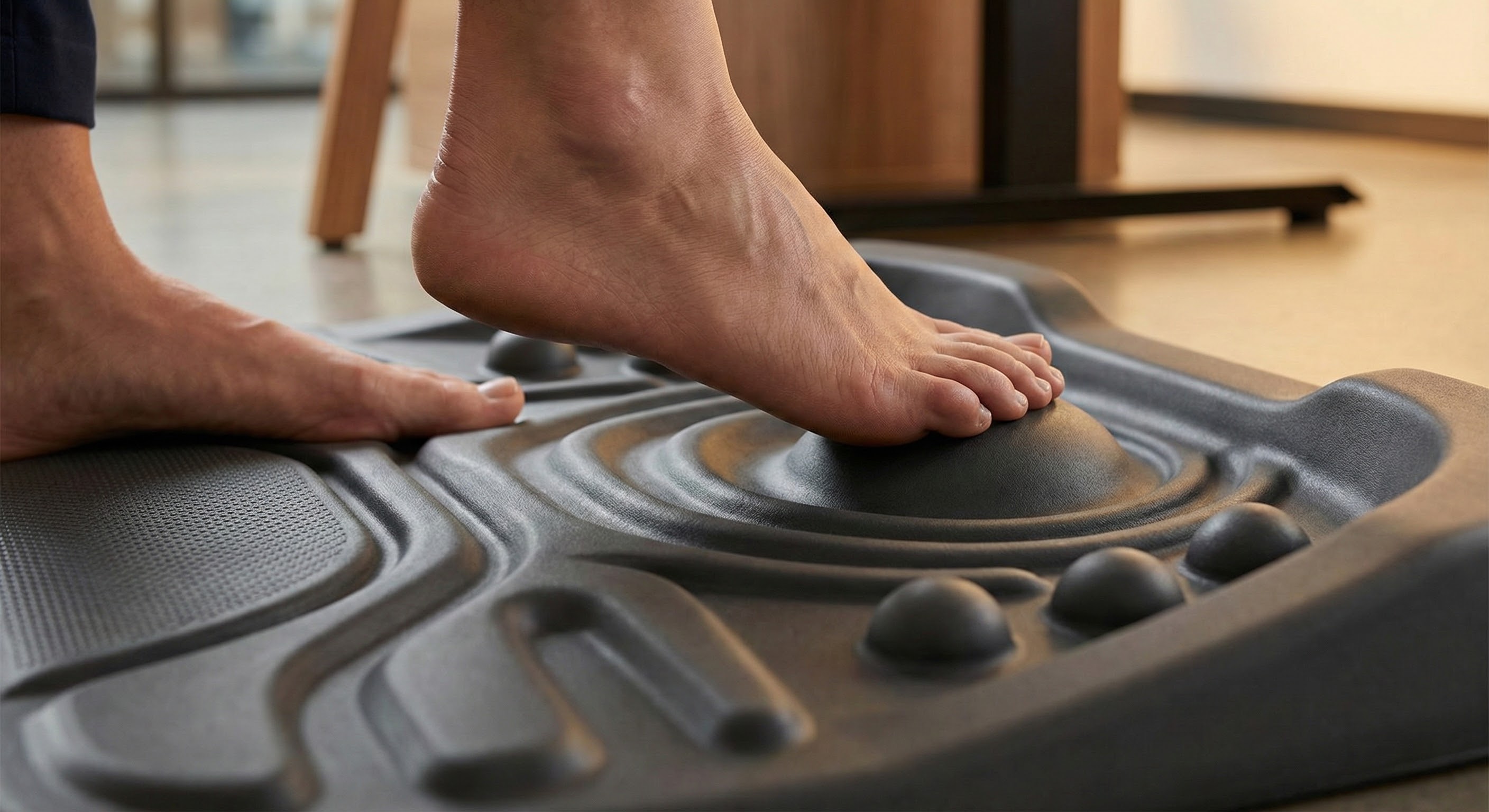
A quality anti-fatigue mat transforms the standing experience. These mats, typically made from polyurethane foam or rubber compounds, provide cushioning that absorbs impact and reduces the strain on joints. However, the best anti-fatigue mats go beyond simple cushioning. Topographical or “topo” mats feature raised ridges, bumps, and varied surface textures that encourage constant micro-movements of the feet and ankles.
This textured surface serves multiple purposes. It makes static standing uncomfortable (which is actually the point), prompting your body to shift constantly. It engages the small muscles of the feet and ankles that atrophy from spending years in supportive shoes on flat surfaces. It activates the calf muscle pump more effectively than standing on a flat surface. The result is reduced fatigue, better circulation, and stronger foot architecture over time.
Footwear matters as well. Standing in heeled shoes, rigid dress shoes, or even heavily cushioned athletic shoes inhibits the foot’s natural function. The ideal situation for standing desk work is barefoot or in minimal shoes (flat soles, wide toe boxes) on a topo mat. This combination allows your feet to move, flex, and strengthen throughout the day. If your workplace requires specific footwear, consider keeping a pair of minimal shoes or thick socks at your desk specifically for standing periods.
The investment in a quality anti-fatigue mat, typically $50-150 for a good topographical design, often determines whether a standing desk becomes a daily tool or an expensive coat rack. This is not the place to economize.
Mistake #3: The Pelvic Dump and Lumbar Collapse
As standing fatigue sets in, postural compensation begins. The most common pattern is the anterior pelvic tilt and lumbar hyperextension combination, colloquially known as “dumping” into the pelvis. You lean forward slightly, let your belly push out, exaggerate the curve in your lower back, and rest your weight on the desk surface or keyboard tray.
This position feels restful momentarily because it transfers load from fatigued muscles to passive structures: ligaments, spinal facet joints, and disc tissue. The relief is temporary and the cost is high. Chronic loading of passive structures leads to back pain, and the position itself creates compressive forces on lumbar discs far exceeding what occurs in neutral standing or sitting.
The fix begins with awareness. The pelvic dump typically happens unconsciously when your core fatigues and your brain seeks any position that reduces muscular work. Notice when you’re leaning, when your belly has pushed forward, when your lower back feels compressed. These sensations are signals that it’s time to either consciously re-engage your posture or, more often, sit down for a while.
A gentle glute engagement, approximately 10% effort, helps maintain pelvic position without creating fatigue. Think about very slightly tucking your tailbone or imagining your pelvis as a bowl of water that you’re trying to keep level. Stack your ribcage directly over your pelvis rather than allowing it to drift forward. This alignment distributes weight through your skeletal structure efficiently rather than dumping it into vulnerable soft tissues.
If you consistently catch yourself in the pelvic dump, you’re probably standing too long for your current capacity. This is feedback, not failure. Reduce your standing intervals and build duration gradually as your postural endurance improves. Trying to power through postural fatigue doesn’t build strength; it builds compensatory patterns that become harder to break over time.
Mistake #4: Screen Height and the Laptop Trap
You’ve raised your desk to standing height, but your laptop remains on the desk surface. Now you’re standing, which is supposedly good, while hunching forward and looking down at a screen positioned far below eye level. Your neck flexes forward, your shoulders round, and your upper back curves into the classic “tech neck” posture. This position may actually be worse than sitting with a properly positioned monitor.
The physics are unforgiving. Your head weighs approximately 10-12 pounds when balanced directly over your spine. For every inch your head projects forward, the effective weight your neck muscles must support increases by roughly 10 pounds. At 3 inches of forward head posture, common when looking down at a laptop, your neck is supporting 40+ pounds of effective load. Hour after hour, this load creates cervical strain, tension headaches, and the rounded upper back posture that becomes increasingly permanent over time.
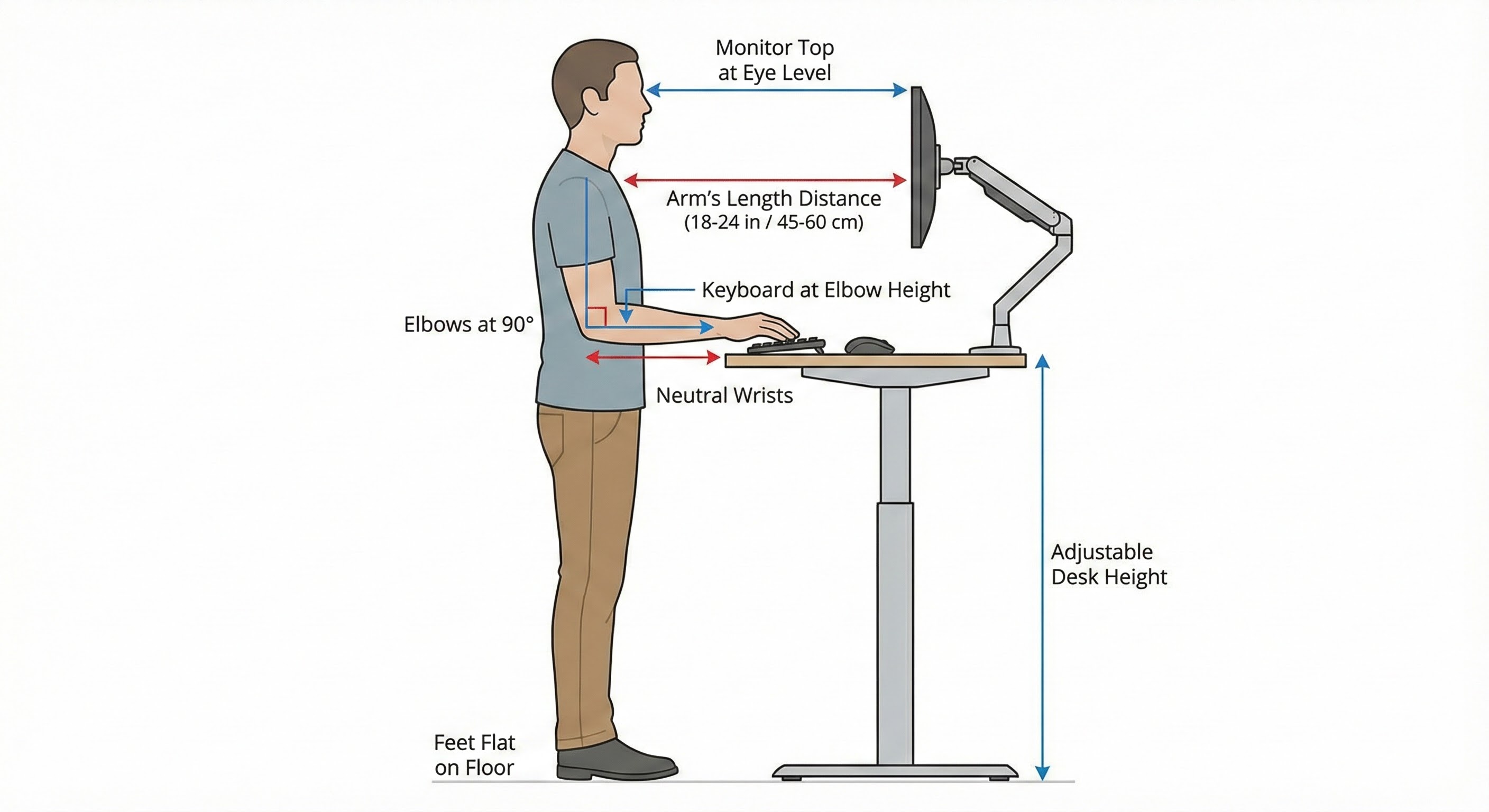
Screen height is non-negotiable: the top of your monitor should be approximately at eye level when you’re looking straight ahead with neutral neck posture. For most people, this requires one of two setups. Either use a dedicated external monitor on an adjustable arm that can move between sitting and standing heights, or use a laptop stand that raises the screen to proper height combined with an external keyboard and mouse positioned at elbow height.
The external keyboard matters because your arms need to be in a different position than your eyes. Elbows should remain at approximately 90 degrees with forearms parallel to the floor, which typically means keyboard height is significantly lower than monitor height. Trying to use a laptop at eye level without an external keyboard creates shoulder strain from reaching up. Trying to use a laptop at keyboard height without raising the screen creates neck strain from looking down. You need separation between input and display to achieve proper ergonomics.
Document and reference materials present similar challenges. If you frequently reference papers or books while working, a document holder positioned at or near screen height prevents the constant neck flexion of looking down at flat documents on the desk surface.
Mistake #5: The All-or-Nothing Approach
The final mistake is treating standing desk adoption like a switch to flip rather than a capacity to develop. Standing all day on day one is the ergonomic equivalent of running a marathon on your first day of training: it doesn’t demonstrate commitment, it guarantees injury and abandonment.
Your body has spent years (or decades) adapted to seated work. Your feet have weakened from supportive shoes on flat surfaces. Your core has atrophied from chair backs doing the stabilization work. Your circulation has adapted to the demands (or lack thereof) of sedentary positioning. Reversing these adaptations requires progressive overload, the same principle that governs all physical training.
A sensible progression starts with 20-30 minutes of standing followed by 40-60 minutes of sitting, rotating throughout the day. Increase standing duration by 10-15 minutes per week based on comfort, not on some arbitrary goal. Listen to your body: if you’re leaning, fidgeting excessively, or catching yourself in compensatory postures, you’ve exceeded your current capacity and need to sit down.
The eventual target for most people is roughly 50/50 time split between sitting and standing, achieved through 30-60 minute blocks in each position. Some people thrive with more standing; others do better with less. Individual anatomy, fitness level, and work demands all influence the optimal ratio. There is no universal correct answer, only the distribution that works for your body and your tasks.
Task matching often helps determine position. Deep focused work might happen better seated with minimal distraction from postural demands. Email and administrative tasks might work better standing when the movement helps maintain energy. Calls and meetings might be opportunities for standing or even walking. Let the work inform the position rather than forcing everything into one mode.
Building a Complete Movement Strategy
The standing desk is one tool in a broader movement strategy, not a complete solution. People who successfully integrate standing desks into their work life typically combine them with several other practices.
Movement snacks are brief activity breaks distributed throughout the day. Every 30-60 minutes, take 2-3 minutes for deliberate movement: walking to refill water, doing a few stretches, taking a lap around the office. These micro-doses of activity prevent the accumulation of stiffness and fatigue that builds during prolonged static work.
Walking meetings replace sedentary conference room time with ambulatory discussion. Not every meeting works for walking, but many do, particularly one-on-one conversations and brainstorming sessions. The movement improves creativity and energy while adding significant activity to days otherwise spent in chairs.
Deliberate position variety means cycling through multiple options rather than just sitting versus standing. Floor sitting, perching on a stool, half-kneeling at a low surface: the more positions you can work in comfortably, the more options you have for distributing load and preventing any single position from accumulating strain.
Strength and mobility work outside work hours builds the capacity to tolerate varied positions. Core strength supports upright posture. Hip mobility prevents the restrictions that make standing uncomfortable. Foot strength enables barefoot standing on textured surfaces. A few minutes of targeted exercise daily pays dividends in work tolerance.
The Bottom Line
A standing desk doesn’t fix your back; movement fixes your back. The desk is a tool that enables more movement options throughout your workday, but only if you use it correctly. Static standing is not better than static sitting. The goal is dynamic variation, constantly shifting between positions to distribute load and keep your body engaged. Complementing your standing desk strategy with regular walking throughout the day amplifies the metabolic and postural benefits, while building overall strength through resistance training creates the muscular foundation needed to maintain good posture during both standing and sitting intervals.
Your standing desk action plan:
- Get a quality anti-fatigue mat. A topographical mat that encourages foot movement is the single most impactful accessory for standing success.
- Set up proper screen height. Top of monitor at eye level, keyboard at elbow height. This usually requires a monitor arm or laptop stand plus external keyboard.
- Start conservatively. Begin with 20-30 minute standing intervals and increase gradually over weeks. There’s no rush.
- Move constantly. Shift weight, use a footrest, change positions within standing. “The best posture is the next posture.”
- Rotate regularly. Aim for position changes every 30-60 minutes, working toward roughly 50/50 sitting and standing over time.
- Listen to feedback. Leaning, dumping into your pelvis, and fidgeting are signals to sit down, not to power through.
The standing desk industry sells transformation; the reality is that transformation requires thoughtful implementation. Most standing desk failures aren’t evidence that standing doesn’t work. They’re evidence that standing without strategy doesn’t work. Get the strategy right, and the expensive desk becomes the valuable tool it was meant to be.
Sources: British Journal of Sports Medicine on breaking up sedentary time, Ergonomics journal on sit-stand desk postural effects, Applied Ergonomics on anti-fatigue mat efficacy, International Journal of Environmental Research and Public Health on standing desk implementation, Cornell University Ergonomics Web on workspace setup guidelines.